Skip to content
Shopify Google Ads at a glance
30%+ Average ROAS improvement in the first 90 days
$3M+ Annual ad spend under management
80+ Shopify projects shipped
4.9★ Client rating
Shopify Google Ads Management
Free Google Ads audit · No commitment
Google Partner
Shopify Partner agency
Feed and tracking built in-house
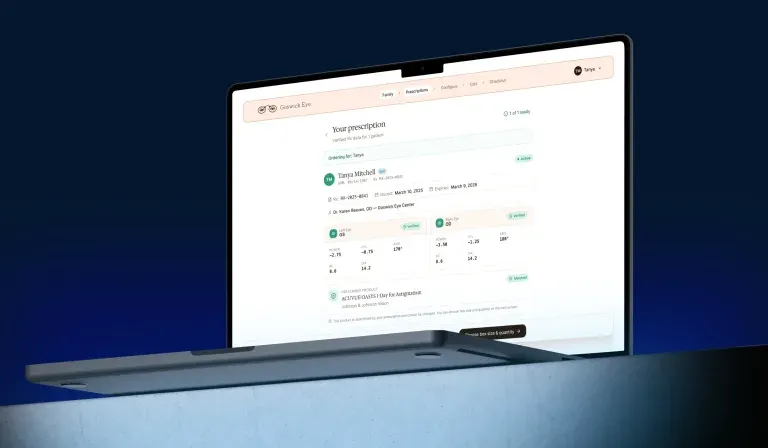
Google Ads and Merchant Center performance view for a Shopify store, with campaign ROAS and product feed status side by side
What this service covers

Paid search that is engineered, not just managed

Shopify Google Ads management is the practice of running Search, Shopping, Performance Max, Demand Gen and YouTube campaigns for a Shopify or Shopify Plus store, with the product feed, the conversion tracking and the landing experience treated as part of the campaign rather than as someone else’s problem. On Shopify, most of what looks like a bidding issue starts in the product data or in a broken purchase event.
Binary Future runs paid search from inside the store. The same team that builds Shopify themes, checkout extensions and ERP and CRM integrations owns the feed, the tracking layer and the pages the ads point to. A variant that stopped syncing to Merchant Center, or a purchase event that broke after a theme update, gets fixed at the source in days instead of being reported as an unexplained drop in account performance.

Google Ads Merchant Center Performance Max GA4 Google Tag Manager Server-side tagging Shopify Flow
The feed is the campaign

On Shopping and Performance Max, most of what people call bidding strategy is really feed quality. Titles, attributes, GTINs and availability decide which auctions the store enters at all.

Tracking before spend

No budget increase is recommended until purchase events, order values and consent handling are verified end to end. Optimising against wrong numbers is more expensive than not optimising at all.

Profit, not just ROAS

Where product margin data exists in your catalogue or ERP, campaigns are optimised against contribution, so the account stops buying revenue that loses money.

Business impact

Why growing Shopify brands rebuild their Google Ads

Performance Max hides what it is doing

Without correct feed segmentation and channel-level reporting, Performance Max absorbs branded search and reports it back as new growth. Structure is what makes the channel accountable.

Broken tracking survives for months

Consent banners, theme updates, app conflicts and checkout changes silently break purchase events. The account keeps bidding against numbers that stopped being true weeks ago.

Feed quality caps reach before budget does

Disapprovals, missing attributes and thin titles remove products from auctions entirely. No budget increase buys back an impression the feed never qualified for.

Ads and store are managed by different people

When the media agency cannot ship a landing page or change a feed rule, every insight becomes a ticket that waits. Cost per acquisition rises while the fix sits in someone else’s queue.

What’s included

Everything in a Shopify Google Ads engagement

A structured review of account structure, spend allocation, feed health and tracking accuracy, before anything is changed.

  • Campaign structure and budget allocation review
  • Search terms, negative keyword and internal overlap analysis
  • Merchant Center and product feed diagnostics
  • Conversion tracking and attribution validation

Conversion Tracking & Measurement

A measurement layer that reports real purchases and real values, so bidding has something true to optimise against.

  • GA4 and Google Ads conversion configuration
  • Server-side tagging and consent mode handling
  • Purchase value, refund and offline conversion import
  • Cross-channel reporting reconciled against Shopify orders

Shopping Feed & Merchant Center

Feed engineering done inside Shopify, so products qualify for the auctions they should be in.

  • Product title, attribute and GTIN optimisation
  • Feed rules, supplemental feeds and variant handling
  • Disapproval, policy and availability monitoring
  • Promotions, sale price and local inventory setup

Search & Performance Max Campaigns

Campaign architecture that separates branded, non-branded and prospecting demand, so results can actually be read.

  • Account structure by margin, brand and intent
  • Performance Max asset groups and listing group segmentation
  • Search campaigns with tight query control
  • Budget pacing and bid strategy management

Demand Gen, YouTube & Remarketing

Upper-funnel and returning-visitor campaigns fed by first-party Shopify audience data.

  • Remarketing and dynamic remarketing lists
  • Customer Match built from Shopify customer segments
  • Demand Gen and YouTube creative testing
  • Audience exclusions, so the account stops paying twice for the same buyer

Landing Page & Offer Testing

The page after the click, built and tested by the same team that builds the store.

  • Dedicated Shopify landing templates for paid traffic
  • Offer, pricing and bundle testing
  • Mobile speed work on paid entry pages
  • Coordination with the Shopify CRO testing roadmap

Reporting, Forecasting & Account Governance

Reporting a founder can act on, plus the discipline that keeps an account clean as it grows.

  • Monthly reporting on spend, revenue and contribution
  • Blended CAC and new-customer reporting
  • Budget forecasting and seasonality planning
  • Change log and account access governance
Expected outcomes

What a Shopify Google Ads programme delivers

Accountable reporting

Branded and non-branded demand separated

You can finally tell real growth from harvesting traffic your brand already had.

Verified purchase data

Tracking validated end to end

Bidding algorithms optimise against numbers that reconcile with Shopify orders.

Higher feed coverage

More products eligible in more auctions

Disapprovals and missing attributes stop capping reach before budget does.

Profit-aware bidding

Contribution, not revenue alone

Where margin data exists, campaigns stop buying orders that lose money.

Faster fixes

One team owns the store and the ads

Feed, tracking and landing page changes ship in days, not in someone else’s sprint.

Lower blended CAC

Paid works with conversion work, not against it

Improvements on the landing side raise the return on every campaign at once.

How we work together

Choose your engagement model

Every account is at a different stage. We offer three models to match your spend level, timeline and internal team.

(fixed scope)
Google Ads Audit
Ideal for:

Stores that suspect the account is underperforming and want evidence before changing agency or budget.

Full account, feed and tracking review
Wasted spend and missed coverage quantified
Prioritised fix list with expected impact
Findings presentation and Q&A session
 (most popular)
Paid Media Retainer
Ideal for:

Stores with consistent monthly spend that need continuous management plus in-store execution.

Ongoing campaign and feed management
Monthly creative, offer and landing page testing
Tracking maintenance after theme and app changes
Reporting on contribution and blended CAC
 (project-based)
Launch Sprint
Ideal for:

Brands launching a new store, a new market or a new product line on paid search.

Merchant Center and feed setup from scratch
Tracking implemented and verified before the first click
Campaign build and first optimisation cycle
Handover documentation and team training
How we deliver

Our Google Ads process

Every engagement follows a structured five-stage process, built so that each decision can be traced back to data.

01

Audit & Measurement Check

We verify tracking, feed health and account structure before touching budget. An account optimised against broken data cannot be improved by spending more on it.

02

Feed & Merchant Center Repair

Product data is corrected inside Shopify at the source, so every downstream campaign inherits clean titles, attributes, pricing and availability.

03

Account Architecture

Campaigns are rebuilt around margin, brand and intent, so each line of spend can be judged on its own instead of disappearing into one blended number.

04

Launch, Test & Learn

Campaigns go live with explicit budget guardrails. Creatives, offers and landing pages are tested in cycles, and losing tests are reported as losses.

05

Scale & Govern

Winning structures take more budget, unprofitable segments are cut, and a monthly review keeps account, feed and tracking healthy as the store changes.

Technologies & capabilities
Agile delivery
QA at every stage
4.9★ avg rating
Common questions

FAQ about Shopify Google Ads

Shopify Google Ads management is the ongoing operation of Google Search, Shopping, Performance Max, Demand Gen and YouTube campaigns for a Shopify or Shopify Plus store. It covers campaign structure and bidding, but also the two things that decide whether those campaigns can work at all: the product feed in Merchant Center and the conversion tracking that reports results back to Google.

A Shopify Google Ads agency audits the existing account and product feed, fixes measurement, rebuilds campaign structure around margin and intent, runs and tests campaigns, and reports on revenue rather than clicks. An agency that also builds on Shopify can fix the feed, the tracking and the landing page itself, instead of raising a ticket with a separate development team.

Google Ads management at Binary Future starts at $800 per month. Media spend is separate and paid directly to the platform.

There is no universal figure. A useful starting point is the budget needed to collect enough conversion data for a bid strategy to learn, which in most categories means at least 30 conversions per campaign per month. Below that threshold, effort is usually better spent on feed quality, tracking accuracy and conversion work than on adding budget.

Tracking and feed fixes often change reported performance within the first weeks, because the account starts measuring correctly. Structural changes need a learning period of two to three weeks per campaign, and a fair read on a rebuilt account usually takes two to three months of consistent spend.

ROAS on its own does not answer the question, because it ignores margin. A store with 70% gross margin and a store with 25% gross margin need very different ROAS to be profitable on the same order. Most DTC brands target somewhere between 3x and 5x on paid search, but the number worth tracking is contribution after cost of goods, shipping and ad spend, measured against your own baseline.

No. Google Ads works on every Shopify plan. Shopify Plus adds checkout extensibility and Shopify Functions, which help on the conversion side of the funnel, and it is relevant for multi-store and multi-market accounts. If you are considering the upgrade, see Shopify Plus development.

Standard Shopping campaigns run only on shopping inventory and give you direct control over bids and product groups. Performance Max spans Search, Shopping, YouTube, Display, Discover and Gmail in one campaign with automated allocation. Performance Max usually delivers more reach, but without careful feed segmentation and brand exclusions it can quietly absorb branded traffic and report it as incremental growth.

The usual causes are mismatched price or availability between the feed and the storefront, missing GTIN or brand values, policy issues in product images or descriptions, and missing shipping or tax configuration. Most of these are fixed in Shopify itself, in product data and feed rules, rather than inside the Google Ads interface.

The base connection is made through the Google & YouTube channel in Shopify, which syncs the catalogue automatically. That default sync is rarely enough for a large or variant-heavy catalogue, so we add supplemental feeds, feed rules and title logic, and monitor disapprovals continuously rather than only at setup.

Yes. Order-level data from Shopify, and margin or cost data from your back office, can be sent back to Google Ads as offline conversions or conversion value adjustments, so bidding optimises against profit instead of gross revenue. When that data lives in an ERP or CRM, it is connected as part of Shopify CRM and ERP integrations.

Yes, with different metrics. B2B accounts optimise toward account registrations, quote requests and first orders rather than immediate checkout, and the buying cycle is longer, so measurement has to follow the lead beyond the session. This works best when the storefront already supports gated pricing and company accounts, as described on B2B Shopify development. See how a B2B catalogue was rebuilt in the Knotty Electrics case study.

Paid search is one of the first places a bad migration shows up: URLs change, tracking breaks and the feed points at pages that no longer exist. We map campaign landing pages and feed URLs into the redirect plan before launch and re-verify conversion tracking on the new store on day one. Migration work itself is covered under Shopify migration services.

They answer different questions. Google captures demand that already exists, which usually converts faster and is easier to attribute. Meta creates demand, which matters more for new products and new categories. Most scaling stores run both, and the useful comparison is blended customer acquisition cost across all channels rather than platform-reported ROAS.

It depends on what the audit finds. If measurement is sound and the structure is workable, we optimise in place, because rebuilding resets learning data. If conversion tracking is wrong, or branded and non-branded traffic are mixed into one reporting line, a rebuild is faster than trying to correct the account around the error.

Binary Future runs paid search from inside the store rather than beside it. The same team handles Shopify development, feed engineering, tracking and conversion work, so a fix in the feed, the theme or the checkout does not have to wait for another vendor. Paid media is planned together with Shopify CRO, which is why the two are usually sold as one growth track rather than as separate line items.

Let’s build together

Find out what your Google Ads account is really doing

Send us access and we will review your account, your Merchant Center feed and your conversion tracking, then show you where the spend is going and what is capping the account. No commitment, and the findings are yours whether or not we work together. If you would rather start with the store side, the same review is available for conversion optimisation.

Google Ads
Merchant Center
No commitment